The storyteller
Elyra
presenter · clear
Turn your words into natural-sounding voiceovers for videos,
presentations, and stories. Right inside Canva.
Free to try · 500 credits every month
 Canva
CanvaWarm and welcoming. Calm and clear. Full of energy.
Press play and find your perfect fit.
presenter · clear
calm · presenter
podcast · deep
fast · energetic
No jumping between tools. Add a voice to the videos and presentations you’re already making.
Find Voiceover AI in Canva’s Apps panel.
Add your script and choose the voice that fits.
Generate your audio and add it to your creation.
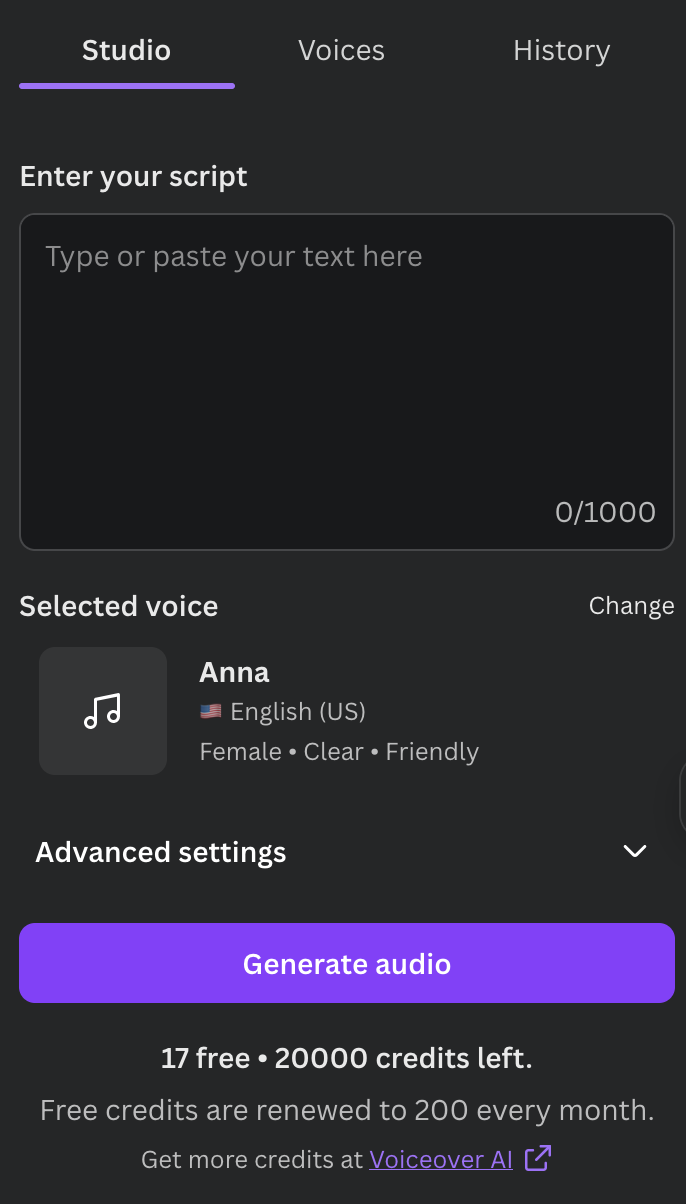
Your voiceover workflow, inside Canva.
A finishing touch that makes your creation feel complete.
Give your reels, explainers, and social videos a voice that holds attention.
Walk your audience through your ideas, one clear narration at a time.
Turn your teaching materials into narrated lessons learners can follow.
A personal story, a product launch, a passion project. Make it yours.
Find a familiar voice for your audience, with languages and regional accents from around the world.
Browse the full voice libraryTry your first voiceover, then choose the credits your next idea needs.
500 credits, renewed monthly
30,000 characters
50,000 characters
Have a smaller project? See all credit packages
Open Voiceover AI from Canva’s Apps panel, or use the Canva button on this page. Add your script, choose a voice, and generate your audio to use in your design.
Yes. Play the recorded voice samples here or browse the full voice library. To generate a voiceover with your own words, open the app in Canva.
Yes. The free plan includes 500 credits each month so you can try the app. If you need more, you can purchase a larger credit package.
You can explore the available languages and regional accents in our voice library. The preview selector on this page only shows languages with available voice samples.
Visit our Help & support page for guidance, or email support@getvoiceover.ai. We’ll help you get back to creating. Visit support →
Bring yours to life with Voiceover AI for Canva.
Try free in CanvaStart with 500 free credits.